
SelfyzAI: AI Video Generator
Mivo studioPhotography
4.31.33K Reviews
- Version
- 8.6.3.110122
- Installs
- 10.00M
- Age Rating
- Teen
Screenshots



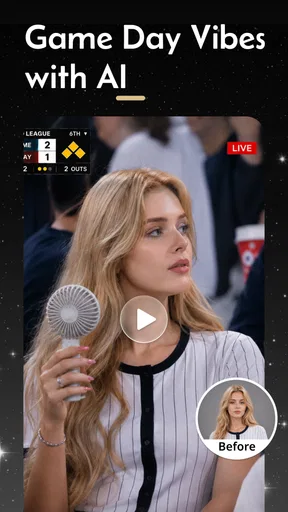


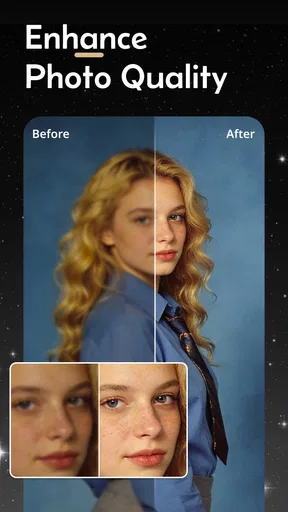
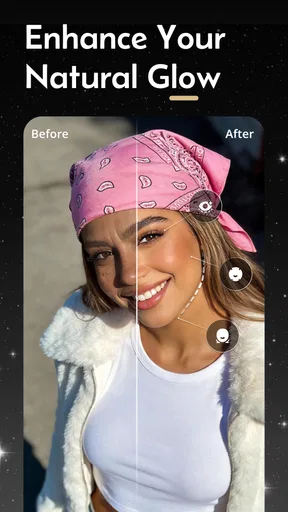
Our Review of SelfyzAI: AI Video Generator
 Analysis by Appyee
If you've ever found yourself scrolling through your camera roll, wishing your pictures had that extra oomph, then SelfyX: AI Photo Editor might just be the app you didn't know you needed. Let me walk you through my experience with this nifty little tool that promises to jazz up your photos with a few taps.
First Impressions
Downloading SelfyX: AI Photo Editor was a breeze. It's available on both Android and iOS, so whether you're Team Apple or Team Android, you're covered. The app has a clean, user-friendly interface that doesn’t overwhelm you with too many options right off the bat. It felt like diving into a pool with clear waters – refreshing, inviting, and just what I needed for my photo editing adventures.
Network Moments and Everyday Use
AI-assisted photo editing can involve more than tapping a shutter button: an edit may depend on the app processing an image, and network conditions can shape how smoothly that kind of work fits into a busy day. I wouldn’t plan an important post around an assumption that every operation will behave identically on a weak connection. If a tool takes longer than expected, I’d wait for the result before repeatedly tapping controls or starting the same task again; that gives the app a chance to finish and avoids creating confusion about which edit is current.
That matters most in ordinary mobile situations. Imagine taking a quick portrait before meeting friends, then trying to tidy it up while walking between places. A light adjustment or a filter is a sensible first step when time is short; a more involved AI effect is better saved for when you can pause and check the result. I’d also make the main edit before sharing, rather than assuming a last-minute change will complete instantly while switching between apps or moving through an unstable signal area.
Features Galore
Once I started exploring, it was clear that this app isn't just about slapping on a filter and calling it a day. It's packed with features that make your photos pop. From basic adjustments like brightness and contrast to more advanced options like AI-powered enhancements, SelfyX has it all.
- AI Magic: The AI tools are the real stars here. They automatically detect and enhance facial features, making sure you look your best without that over-edited look. It's subtle yet effective.
- Filters and Effects: With a multitude of filters, you can easily switch up the mood of your photos. Whether you're after a vintage vibe or a modern aesthetic, there's something for everyone.
- Background Change: This feature is pure fun. With a few taps, I was able to change the background of my selfies to anything – from a sunny beach to a bustling cityscape.
Getting More from a Portrait Edit
A useful way to keep the result believable is to treat the automatic enhancement as a starting point, not a final instruction. I’d compare the edited face with the original before saving or sharing, especially around skin texture and facial edges. If an enhancement makes a feature look unlike you, backing off is better than piling on another effect to disguise it. The strongest result is often the one that still looks like the person in the source image.
Background replacement calls for a different check. I’d look closely at the outline around hair, shoulders, and other fine details, then consider whether the new setting fits the lighting and pose. A dramatic scene can be entertaining for a playful selfie, but it may look out of place in a profile photo meant to feel natural. For a cleaner workflow, choose the portrait first, settle on the intended mood, and only then decide whether a new background adds anything. This avoids spending time polishing a scene you later replace.
User Experience
Using SelfyX felt intuitive. The app guides you gently through the editing process. There's a little wizard that pops up with tips, which is super helpful if you're new to photo editing or just looking to maximize the app's potential. The speed of processing was impressive too – no lagging or crashing, which is always a win in my book.
When a Connection Interrupts the Flow
If an effect stalls or an edit seems not to respond, I’d avoid immediately repeating every step. First check whether the image has finished processing, then return to the same photo and inspect what is actually applied. If the result still has not appeared, trying again when the connection is steadier is a calmer approach than making several overlapping attempts. I also wouldn’t close the app in the middle of a change unless I had checked whether the result was saved; that simple pause can prevent losing track of the version I wanted.
For a time-sensitive task, keep a copy of the unedited photo in your camera roll and finish the creative choices before you are in a rush. That is useful with any editor, but particularly with AI effects, where the outcome may take more steps than a quick crop or brightness adjustment. It also gives you an easy fallback if you decide the edit is too strong or want to start fresh without trying to reverse several changes.
Choosing the Right Tool for the Job
Compared with a basic phone gallery editor, this app is more appealing when I want portrait-focused changes, a quick stylistic treatment, or a playful background swap in one place. A built-in editor is often the better choice for a fast crop, a small exposure correction, or a straightforward image that does not need a distinctive look. It usually keeps the task simple, while SelfyX is more about experimenting with the face and overall presentation.
At the other end, a full desktop photo editor is the stronger option when I need detailed control over layers, precise retouching, or a repeatable professional workflow. SelfyX makes more sense for casual, phone-first editing than for replacing that kind of careful work. If you make images for a business or need every portrait to match a strict visual standard, I’d inspect each output closely and use a more controllable tool when consistency matters more than speed or convenience.
Who Will Enjoy It, and Who May Not
I can see this being a good fit for someone who takes plenty of selfies and wants to try an enhancement without learning a complicated editing interface. It also suits people who enjoy changing the atmosphere of a portrait before sharing it with friends. If you rarely edit faces, prefer unaltered photographs, or only need occasional basic corrections, the extra creative tools may be more than you need.
There is also a difference between a fun edit and a dependable record. I would not use a changed background or heavily enhanced face for an image where accuracy matters, such as a document or a photo meant to represent a real scene faithfully. For everyday social pictures, experimentation is part of the appeal; for factual or work-related images, restraint and a conventional editor are safer choices.
Data-Conscious Editing
Because this is a photography app with AI-assisted tools, I’d think about the image itself before choosing an effect. A casual portrait is different from a sensitive photo of a child, a private moment, or an image containing personal details in the background. I make a habit of checking the frame for names, screens, addresses, or other information I would not want to share, and I avoid treating a social sharing option as a private archive.
The app is free to download, while optional in-app purchases range from $2.99 to $69.99 per item. I’d explore the available editing flow first and decide whether the features I actually use justify spending anything, rather than paying simply because an upgrade is presented. That is especially sensible if I only want one occasional portrait touch-up. Its Teen content rating is another practical detail for families deciding whether it is suitable for a younger photographer.
Why It Stands Out
What truly sets SelfyX apart from other photo editors is its emphasis on AI capabilities. The app doesn’t just make your photos look good; it makes them look naturally good. It's like having a personal photo editor who knows exactly what works for your face and style. Plus, the app's community feature lets you share your creations and get inspiration from others, which I found quite engaging.
The broader picture is reassuring for anyone deciding whether the app is established enough to try: Mivo studio is the developer, and the app has a 4.6 average from around 145,000 ratings, alongside over 10 million installs. It first appeared on May 31, 2018, and version 8.4.1.110003 is the current release. Those figures suggest a widely used product, but they do not tell me whether a particular AI result will suit my face or taste, so I’d still judge it by a few edits of my own.
Final Thoughts
So, is SelfyX worth the download? Absolutely. Whether you're a selfie aficionado or someone who just wants to enhance their photo collection, this app offers a balanced mix of fun and functionality. It's like having a mini Photoshop in your pocket, minus the complexity. Give it a shot, and you might just find yourself falling down a delightful rabbit hole of creativity.
For a seamless download and to start transforming your photos, check out SelfyX on your respective app store. And hey, let me know how it goes – I'm curious to see how it elevates your photo game!
My Connectivity Verdict
For me, the best way to use this editor is to separate quick fixes from edits that deserve a little patience. I’d make simple changes when I have only a moment, save or check the finished image before moving on, and save ambitious AI experiments for a steadier stretch of time. I wouldn’t choose it as my only option for urgent, precision-critical work, but for casual portrait creativity on a phone, it offers a friendly place to experiment. With realistic expectations about processing, sensible attention to image privacy, and a willingness to keep the original, it is an enjoyable tool rather than a magic replacement for every other editor.
Verdict
Strengths of SelfyzAI: AI Video Generator
- User-friendly interface for easy navigation.
- Wide range of AI filters and effects.
- Quick processing with minimal lag.
- Customizable editing tools for precision.
- Regular updates with new features.
Limitations of SelfyzAI: AI Video Generator
- In-app ads can be intrusive.
- Limited free features available.
- Large app size may affect storage.
- Requires internet for most features.
- Occasional AI inaccuracies in edits.
Similar Picks in This Category
View All
Google Photos
Google LLC4.4

Gallery
Google LLC4.2

Picsart AI Photo Editor, Video
PicsArt, Inc.3.9

B612 AI Photo&Video Editor
SNOW Corporation4.1

BeautyPlus-Selfie Photo Editor
PIXOCIAL TECHNOLOGY (SINGAPORE) PTE. LTD.4.5

Remini - AI Photo Enhancer
Bending Spoons4.1
Frequently Asked Questions
What features does SelfyX: AI Photo Editor offer?
SelfyX: AI Photo Editor provides a range of advanced features, including AI-powered enhancements, real-time filters, and background editing. Users can also access a variety of editing tools such as cropping, brightness adjustment, and contrast tuning. Additionally, the app offers unique effects and templates designed to elevate your photos instantly.
Is SelfyX: AI Photo Editor free to use?
SelfyX offers a free version with basic features, but to access premium tools and filters, users may need to subscribe to a paid plan. The premium version provides additional functionalities like advanced AI effects, ad-free experience, and exclusive filter packs, enhancing the overall photo editing experience.
Does SelfyX: AI Photo Editor require an internet connection?
While SelfyX can perform basic editing tasks offline, an internet connection is necessary for downloading new filters and updates. Additionally, some AI-driven features that require cloud processing also need an active internet connection to function optimally, ensuring users get the best editing results.
Is SelfyX: AI Photo Editor easy to use for beginners?
Yes, SelfyX is designed with user-friendliness in mind, making it accessible for both beginners and advanced users. The intuitive interface allows users to navigate through various editing tools effortlessly. Guided tutorials and tips are also available within the app to help new users make the most out of its features.
On which devices is SelfyX: AI Photo Editor available?
SelfyX: AI Photo Editor is available for both Android and iOS devices. Users can download the app from the Google Play Store for Android devices or the Apple App Store for iOS devices. It supports a wide range of smartphones and tablets, ensuring compatibility and smooth performance across different platforms.
